VerseIsland
Feed Learn Leaderboard Guides Explore Search Docs Verse Library
Sign in
Feed Learn Leaderboard Guides Explore Search Docs Verse Library
Fortnite › General · Up to Fortnite · General · 4 of 123 in General
Browse Fortnite

5. Define the Miniboard

The miniboard shows a player a view of their own board. Hit markers indicate that a board tile has been attacked and the enemy successfully destroyed a pawn at that tile. Miss markers indicate that a board tile has been attacked and the enemy did not hit anything.

The miniboard itself is a static mesh placed with respect to the gameplay camera so it appears as part of the game user interface. To place the miniboard, a few things must be known:

  • The gameplay camera transform.
  • How far to offset the miniboard from the camera.
  • The board grid size.
  • The static mesh to use for the miniboard.

The camera transform can be accessed from the gameplay camera, so add a reference to the gameplay camera. The second can be done by trial and error through UEFN, so it can be an editable vector. The third can be accessed through a reference to the player's game board. The last can be stored through a reference to the asset generated through the Verse Assets.digest.verse.

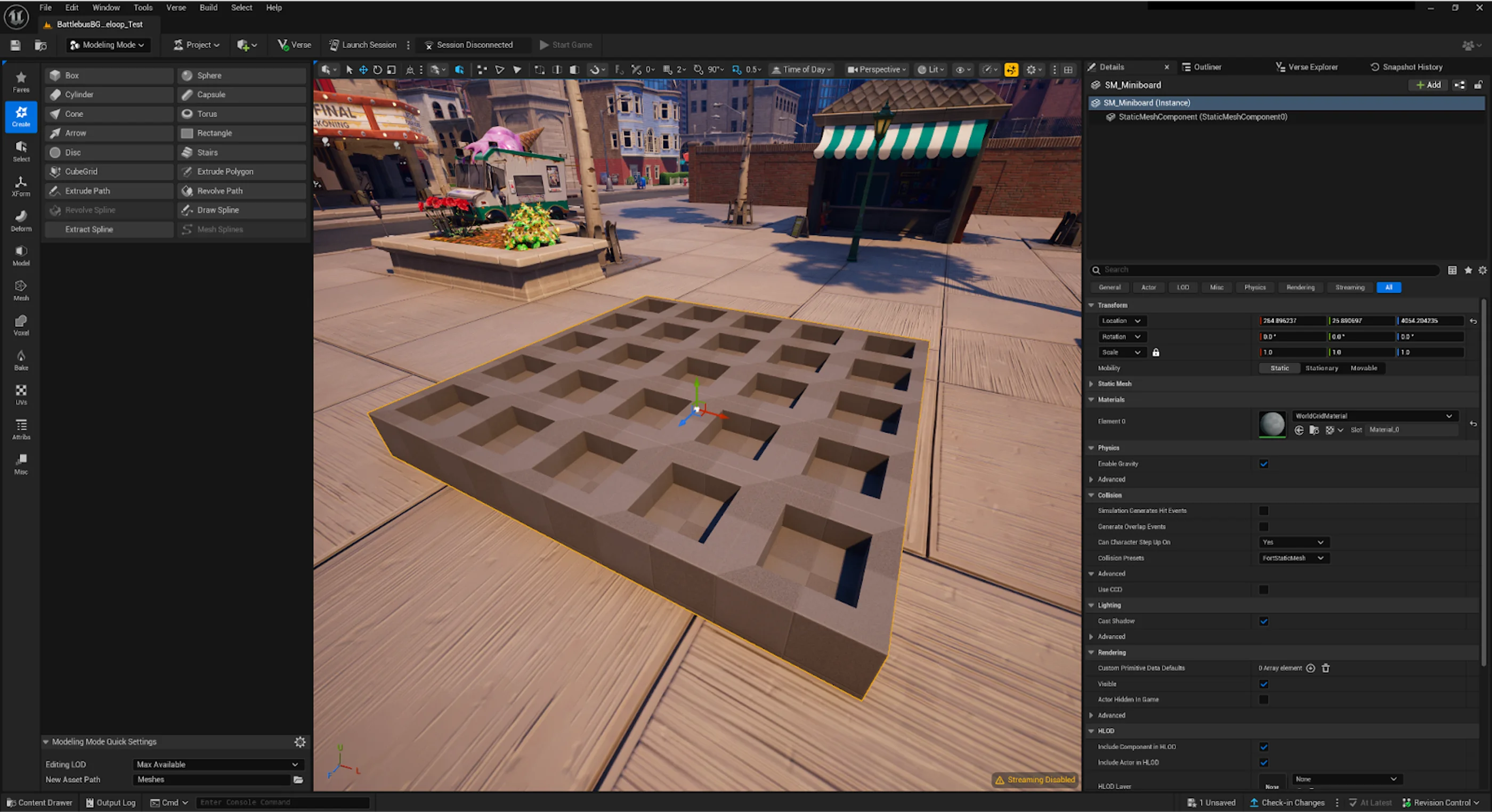
The miniboard was created in UEFN Modeling mode to model a simple static mesh. It is named SM_Miniboard.
You're reading a preview

The full reference is free for BrainDeadGuild Discord members — sign in to read it all, or open the original at the source.

Sign in with Discord — free for members Read the original at Epic Games

Sign in with your BrainDead.TV / BrainDeadGuild Discord account for full access.

Comments

    Sign in to vote, comment, or suggest an edit. Sign in
    📄
    Source
    Epic Games

    © Epic Games. Official Epic developer documentation, shown here as a reference with a link to the original. All rights remain with Epic Games. Terms ↗

    View original Sources & licensing
    Request removal
    Last updated May 12, 2026
    Keep exploring
    More in General · 4 of 123
    Prev
    4 generate the board
    Next
    6 set miniboard markers
    Browse all files in this folder (A–Z)
    Related topics
    • Overview Of Coordinate Spaces General
    • 6 Set Miniboard Markers General
    • 2 Define The Game Board General
    • Fortnite Creative Glossary Verse Language
    • Fortnite Creative Glossary Verse Language

    Related

    Open in graph →

    Related topics

    • Overview Of Coordinate Spaces
    • 6 Set Miniboard Markers
    • 2 Define The Game Board
    • Fortnite Creative Glossary
    • Fortnite Creative Glossary
    VerseIsland · an archipelago of Verse & UEFN knowledge
    Learn Guides History About & Press Sources & Licensing Status

    Not affiliated with Epic Games. Fortnite, UEFN, Unreal Engine, and Verse are trademarks of Epic Games, Inc. Content is attributed to its source — see Sources & Licensing.