
Using Patchwork Omega Synthesizer devices in Fortnite Creative
The Omega Synthesizer (O-SYN) device is an audio generator that converts note data from a note generator like the Patchwork Note Sequencer into audio data. That data can then be sent to an audio effect device for further manipulation, or to an output device like a Patchwork Speaker so players can hear it.
The Omega Synth has many presets that sound good out of the box, and gives you the ability to tweak the knobs yourself to get the sound you're looking for!
Device Options
All of the settings that can be manipulated with the Patchwork Tool can also be adjusted using the Customize panel in Create mode, or using the Details panel in UEFN.
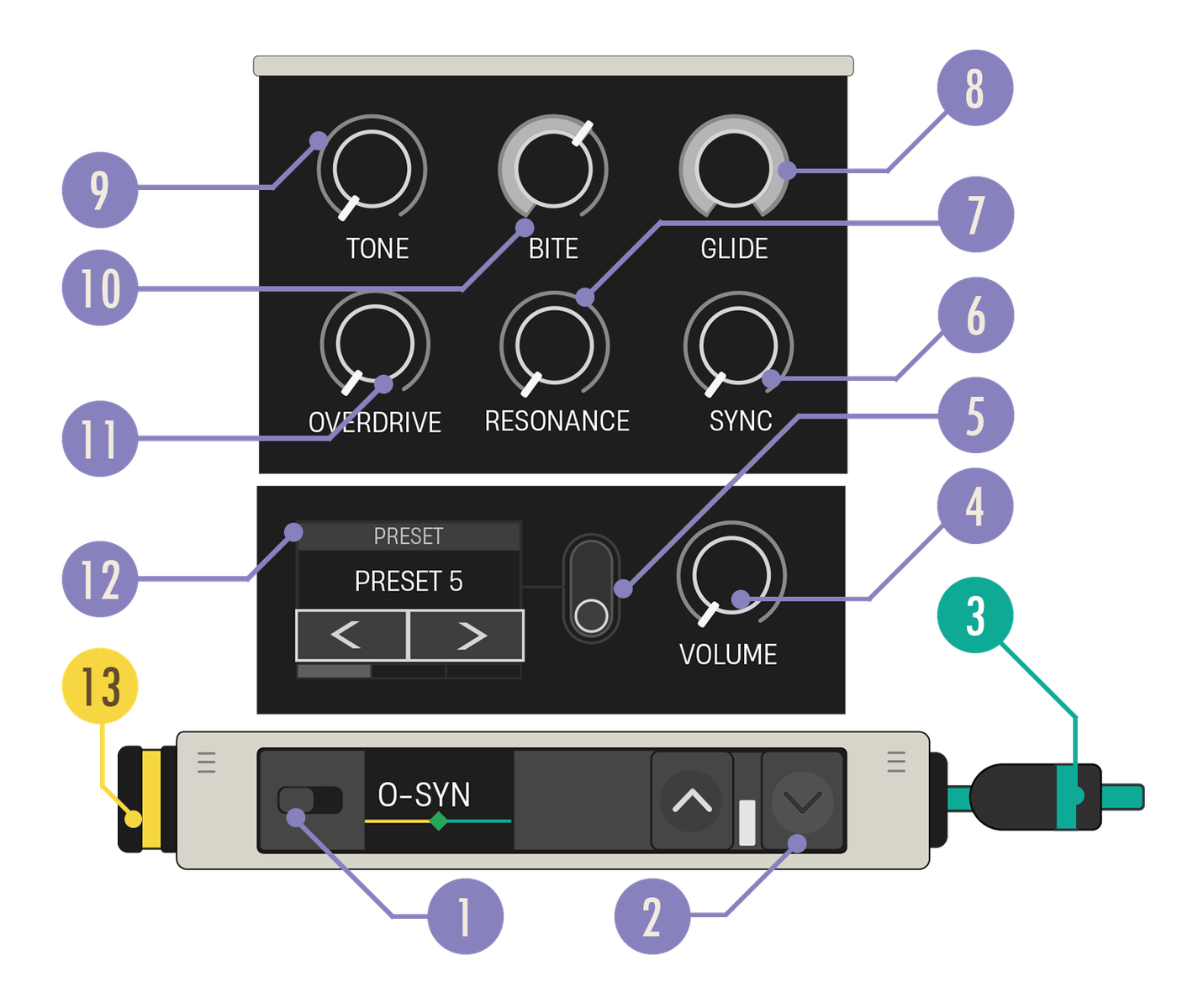
| Option | Values | Description |
|---|---|---|
| 1. Device Enabled Switch | On, Off | When Off, the synth does not produce any audio and the signal chain ends. |
| 2. Expand Buttons | Closed, Open | Expand the device to reveal more customization options. |
| 3. Audio Out Cable | N/A | The Audio Out cable needs to be connected to a teal Audio In port. |
| 4. Volume Knob | 0.00 - 2.00, default 1.00 | Set the volume of the synth output. |
| 5. Presets Toggle | On, Off | When the Preset carousel is toggled On, the knob values on the expanded panel are set to the preset values. These will override previous values. |
| 6. Sync Knob | Values: 0.00-1.00, default 0.50 | Adjusts the degree of synchronization between oscillators. |
| 7. Resonance Knob | Values: 0.00-1.00, default 0.50 | Sets the size of the bump to the frequencies around the filter cutoff. |
| 8. Glide Knob | 0.00-1.00, default 0.50 | Determines how long it takes to blend to a new pitch. |
| 9. Tone Knob | 0.00-1.00, default 0.70 | Blends the wave pattern between square, saw, and detuned dual saw waves. |
| 10. Bite Knob | 0.00-1.00, default 0.50 | Sets filter envelope amount. |
| 11. Overdrive Knob | 0.00-1.00, default 0.20 | Sets the amount of distortion applied to the signal. |
| 12. Presets Carousel | Various | Selects a collection of knob settings to achieve a specific sound. |
| 13. Note In Port | N/A | Can only receive a yellow Note Out cable. This device is monophonic, meaning it can only play one note at a time even if you create multiple simultaneous note inputs. However, you can use multiple Omega Synth devices to simulate a polyphonic sound. |
You're reading a preview
The full reference is free for BrainDeadGuild Discord members — sign in to read it all, or open the original at the source.
Sign in with your BrainDead.TV / BrainDeadGuild Discord account for full access.