VerseIsland
Feed Learn Leaderboard Guides Explore Search Docs Verse Library
Sign in
Feed Learn Leaderboard Guides Explore Search Docs Verse Library
Fortnite › Verse Language · Up to Fortnite · Verse Language · 57 of 570 in Verse Language
Browse Fortnite

Making a Custom Mini Map in Unreal Editor for Fortnite

A map and minimap are important tools that help players navigate a large game world while providing critical information about terrain, objectives, and points of interest. A map can give players a quick overview of the game environment, either for navigating landscapes or engaging in intense strategic battles. Maps contribute a lot to overall gaming experience, whether exploring mazes, uncovering hidden treasures, or simply planning routes.

In Unreal Editor for Fortnite (UEFN), use the Map Controller devices to:

  • Change the framing of the map and immediately preview the results.
  • Control the zoom on the minimap when the device is active.
  • Place multiple Map Controller devices on your island and activate them as needed.
  • Customize the look and feel of your maps.

Positioning the Device

In the Content Browser, navigate to Fortnite > Devices, then find and drag a Map Controller device into your viewport. Notice the map preview screen appears at the bottom right.
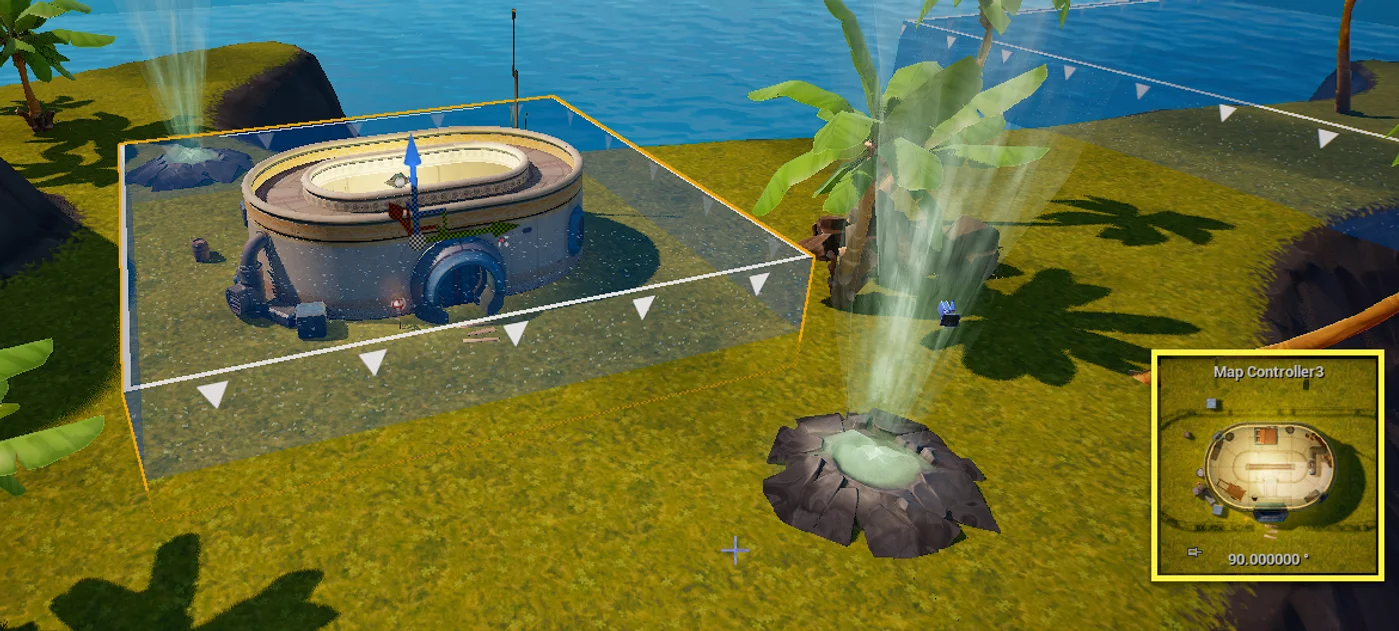
map preview

Use the edges of the device volume to define the area captured for the map. The Map Controller displays everything beneath the area that it covers (the downward triangles indicate where the top of the device is).

You're reading a preview

The full reference is free for BrainDeadGuild Discord members — sign in to read it all, or open the original at the source.

Sign in with Discord — free for members Read the original at Epic Games

Sign in with your BrainDead.TV / BrainDeadGuild Discord account for full access.

Comments

    Sign in to vote, comment, or suggest an edit. Sign in
    📄
    Source
    Epic Games

    © Epic Games. Official Epic developer documentation, shown here as a reference with a link to the original. All rights remain with Epic Games. Terms ↗

    View original Sources & licensing
    Request removal
    Last updated Feb 10, 2026
    Keep exploring
    More in Verse Language · 57 of 570
    Prev
    loop and break in verse
    Next
    map in verse
    Browse all files in this folder (A–Z)
    Related topics
    • Using Map Controller Devices In Fortnite Creative Devices
    • Ingame User Interfaces In Unreal Editor For Fortnite Ui
    • Using Map Controller Devices In Unreal Editor For Fortnite Devices
    • Create A Dungeon Crawler Game In Fortnite Creative Tutorials
    • Fortnite Creative Glossary Verse Language

    Related

    Open in graph →

    Related topics

    • Using Map Controller Devices In Fortnite Creative
    • Ingame User Interfaces In Unreal Editor For Fortnite
    • Using Map Controller Devices In Unreal Editor For Fortnite
    • Create A Dungeon Crawler Game In Fortnite Creative
    • Fortnite Creative Glossary
    VerseIsland · an archipelago of Verse & UEFN knowledge
    Learn Guides History About & Press Sources & Licensing Status

    Not affiliated with Epic Games. Fortnite, UEFN, Unreal Engine, and Verse are trademarks of Epic Games, Inc. Content is attributed to its source — see Sources & Licensing.