
Lighting Scalability Manager
The Lighting Scalability Manager in Unreal Editor for Fortnite (UEFN) is used to hide and show lights and post process volumes (PPV) based on specific scalability settings (cinematic, epic, high, medium and low). This allows you to customize and optimize your lighting per platform and situation.
Behind the scenes the Lighting Scalability Manager is listening to changes in Global Illumination Quality.
Using the Lighting Scalability Manager
The Lighting Scalability Manager can be found in the ContentBrowser under All > Fortnite > Lighting > Tools.
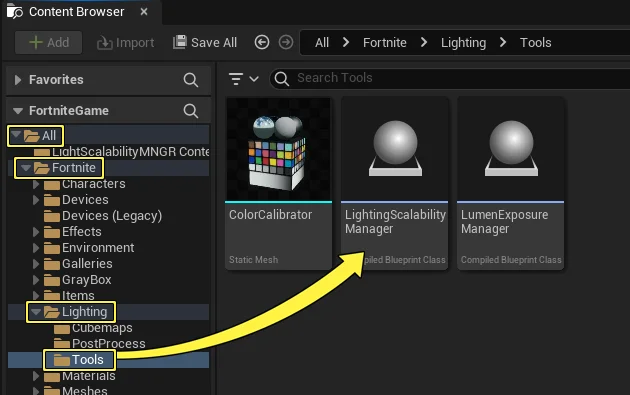
To use the Lighting Scalability Manager:
-
From the Content Browser search for the Lighting Scalability Manager in the search bar, drag the Lighting Scalability Manager thumbnail into the viewport. The thumbnail is replaced with an Editor Icon in the scene.
-
Open the Actor dropdown menu in the toolbar and select a light actor to add to the scene.
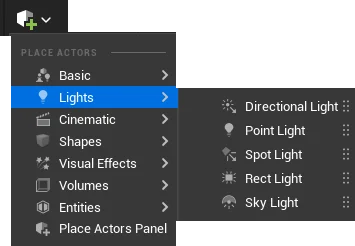
-
In the Outliner, rename your lighting actor Low.
-
In the Outliner duplicate the lighting actor until you have two more copies, then rename them:
You're reading a preview
The full reference is free for BrainDeadGuild Discord members — sign in to read it all, or open the original at the source.
Sign in with your BrainDead.TV / BrainDeadGuild Discord account for full access.