
Making a Cave
Making a Cave
Tunnels or caves that players can drive or walk through can also contain spaces where players can explore and find hidden treasures.
Tunnels or caves that players can drive or walk through can also contain spaces where players can explore and find hidden treasures.
Plan where you'll place the cave entrance on your mountain. It should be a place players can easily access. The best place is on ground level or at the lowest level of a mountain so you have the space to create the type of cave you want.
To create the cave or tunnel, you’ll need the Landscape Visibility tool and the Fort Underground Volume. Without the volume, players despawn from the world after entering the cave, and vehicles teleport to the terrain above the cave.
When you’ve decided where to start the cave, switch to the Sculpt tools and select Visibility.
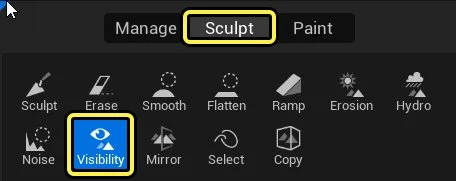
Use the following Visibility settings:
- Set the Brush type to Simple Circular and Brush Falloff to Sharp Linear.
- Set the Brush Size to 250.0 and keep the Brush Falloff at 0.25.
- Select the spot where you want to place your cave and left-click. You should have a realistic looking cave entrance.
You're reading a preview
The full reference is free for BrainDeadGuild Discord members — sign in to read it all, or open the original at the source.
Sign in with your BrainDead.TV / BrainDeadGuild Discord account for full access.