
Patchwork Note Progressor Device
The Note Progressor (N-PRG) device is a way to make your note sequences follow a chosen chord progression. You can also use it to change keys while staying in the scale of the Music Manager, creating conventionally pleasing chord progressions.
When active, the device indicates which chord in the progression is currently playing. Each knob has 14 settings, accounting for transposition both up and down. These values are shown in Roman numerals.
Device Options
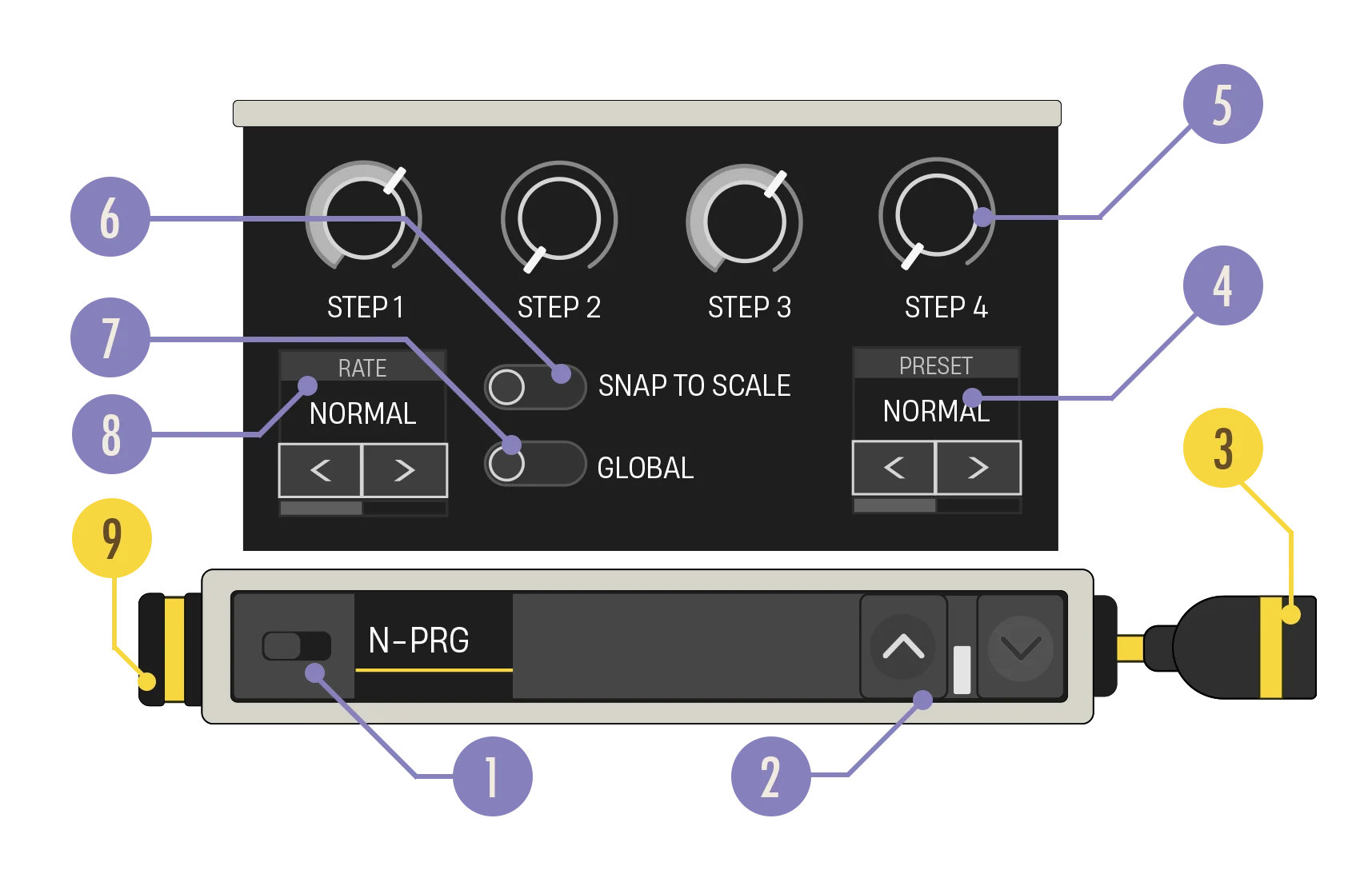
| Option | Values | Description |
|---|---|---|
| 1. Enabled Switch | On, Off | When Disabled, no note data is generated. |
| 2. Expand Buttons | Closed, Open | Expand the device to reveal more customization options. |
| 3. Note Out Cable | N/A | Connect the Note Out cable to a yellow Note In port. |
| 4. Preset Progression Carousel | Various | Cycle through preset progressions. When you change the carousel value, the Transposition Knobs jump to the settings of that preset. Note that some presets are marked with Maj (Major) or Min (Minor) because they are traditionally used with this scale. Check the Key Mode carousel on the Patchwork Music Manager to see which scale you’re using. |
| 5. Transposition Knobs 1 to 4 | ▼I, ▼II, ▼III, ▼IV, ▼V, ▼VI, ▼VII, I, ▲II, ▲III, ▲IV, ▲V, ▲VI, ▲VII, ▲I; default I | Indicates where the input note will be transposed based on the root note. |
| 6. Snap to Scale Toggle | On, Off | When enabled, snap all incoming notes to the current scale, keeping all notes diatonic. When disabled, allow non-diatonic notes to pass through. |
| 7. Global Toggle | On, Off | When Global is on, all other Note Progressors with this toggle set to On will share the same settings. This makes it easy to change all Note Progressors set to Global to the same chord progression. |
| 8. Rate Carousel | 1-4 Bars, default 1 Bar | Indicates how many bars will play with each chord tone before progressing to the next. |
| 9. Note In Port | N/A | Can only receive a yellow Note In cable. |
You're reading a preview
The full reference is free for BrainDeadGuild Discord members — sign in to read it all, or open the original at the source.
Sign in with your BrainDead.TV / BrainDeadGuild Discord account for full access.