
Patchwork Music Manager Device
The Music Manager (M-MGR) device provides a way for you to set the key, mode (major or minor), and tempo of the audio mix for all Patchwork devices on your island. It ensures that all Patchwork devices stay in time and in key with each other. It is not directly part of anyPatchwork device chain, though its controls can be manipulated by modulator devices.
Device Options
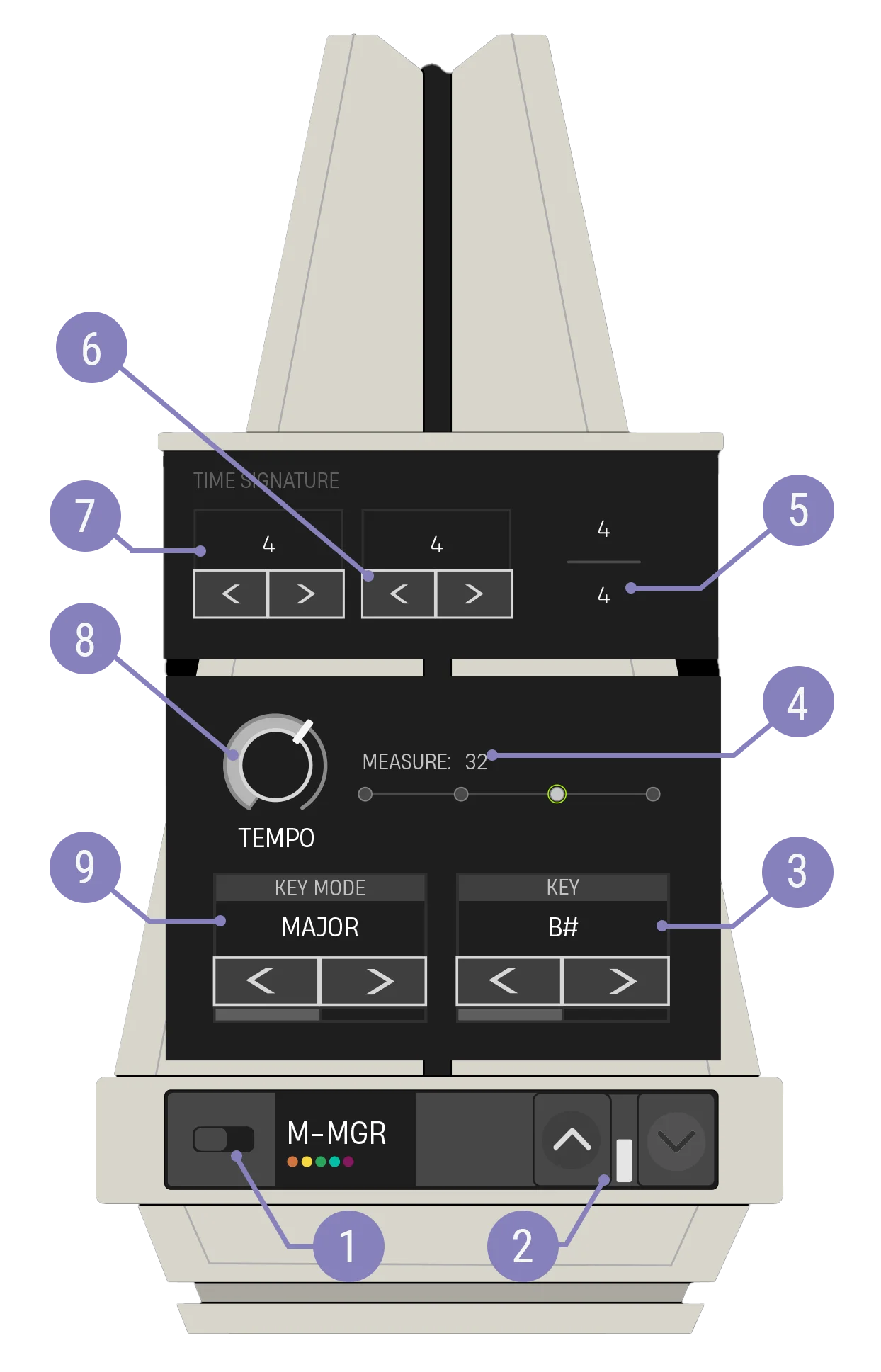
| Option | Values | Description |
|---|---|---|
| 1. Enabled Switch | On, Off | When enabled, playback begins from beat 0. When disabled, other devices can still be interacted with and modified, but their functionality will be limited. For example, behaviors that fire every beat won't activate, as beats are not being counted. |
| 2. Expand Buttons | Closed, Open | Expand the device to reveal more customization options. |
| 3. Key Carousel | C, C♯/D♭, D, D♯/E♭, E, F, F♯/G♭, G, G♯/A♭, A, A♯/B♭, B, default Random | Selects the key for all Patchwork note generators. |
| 4. Beat Visualization | N/A | An animated timeline showing the beats per measure and the current beat within the measure, as well as a counter indicating the current measure. |
| 5. Time Signature Display | N/A | Shows the time signature in a traditional fractional display, with the beats per measure over the note length per beat. |
| 6. Time Signature Bottom Value Carousel | 2, 4, 8, 16 | Sets the note length per beat in the time signature. A value of 2 represents a half note per beat, 4 represents a quarter note per beat, and so on. |
| 7. Time Signature Top Value Carousel | 4, pick a number between 2-15 | Sets the number of beats per measure in the time signature. |
| 8. Tempo Knob | 60-180, default Random within range of 80-160 | Sets the tempo for all Patchwork devices. |
| 9. Key Mode Carousel | Major, Minor, default Random | Sets the mode for the entire mix. Major usually lends itself to a happier tone while a minor mode is generally associated with sadder music. |
You're reading a preview
The full reference is free for BrainDeadGuild Discord members — sign in to read it all, or open the original at the source.
Sign in with your BrainDead.TV / BrainDeadGuild Discord account for full access.