
Patchwork Step Modulator Device
The Step Modulator (S-MOD) device lets you directly set a series of values for the controls on other Patchwork devices. Patch the Step Modulator cable into other device controls to create sequenced patterns with settings that you define in the Step Modulator.
Device Options
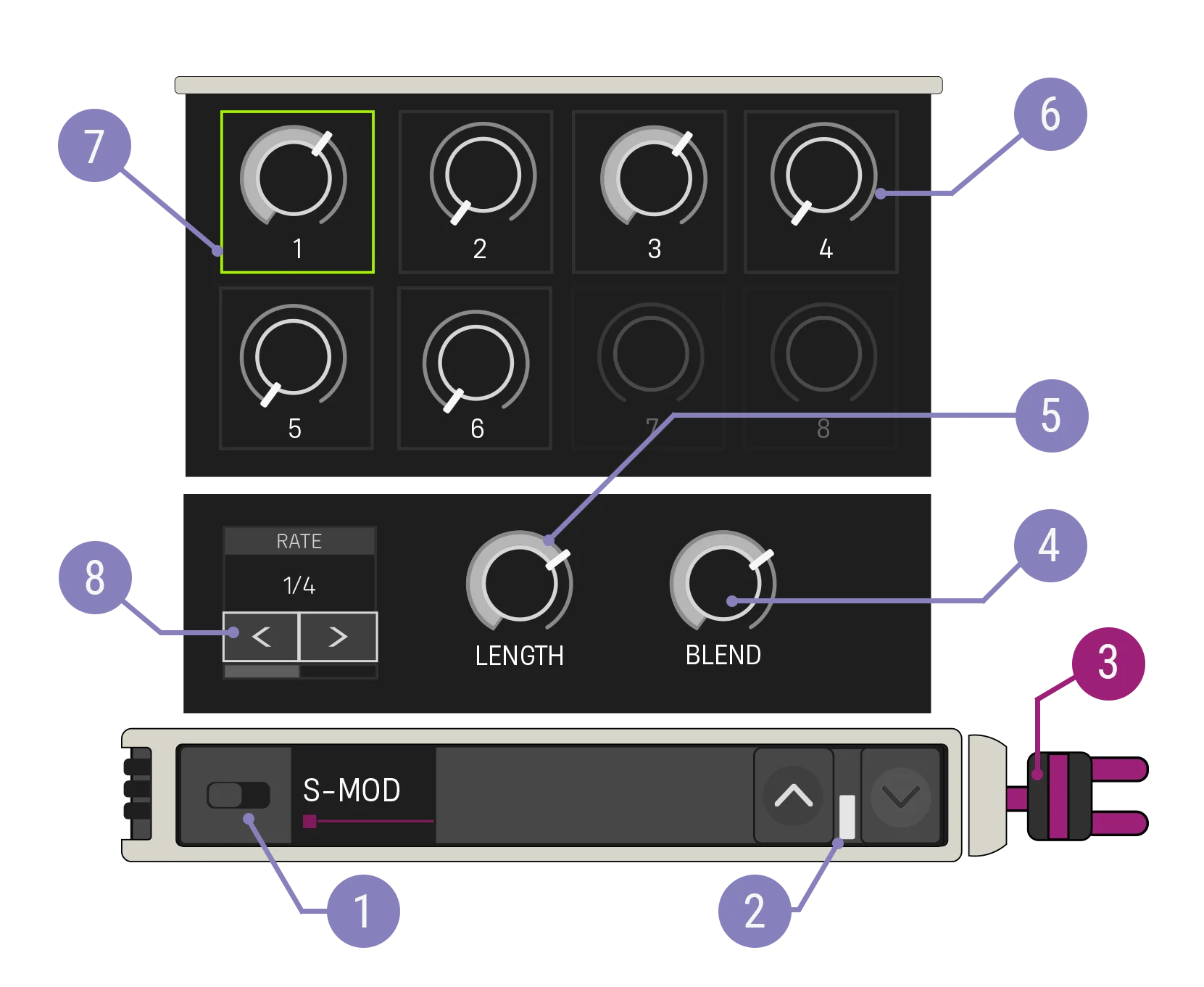
| Option | Values | Description |
|---|---|---|
| 1. Enabled Switch | On, Off | When Disabled, the targeted control is not modified. |
| 2. Expand Buttons | Closed, Open | Expand the device to reveal more customization options. |
| 3. Modulator Cable | N/A | The Modulation Out cable should be patched to a control on another Patchwork device. |
| 4. Blend Time Knob | -1 to 1, 0 | Sets a percentage of the time between steps to blend between the steps' values. Setting this control to a positive value will begin blending at the step time, while setting it to a negative value will begin blending before the step time. |
| 5. Length Knob | 1 - 8 | Number of steps in the sequence before it loops back to the beginning. |
| 6. Step Value | Various | Determines the value to be sent when this step is active. The step value control changes to reflect the targeted control. Patch the device to the control you want before setting these values to make sure you get the output you want. |
| 7. Currently Active Step | N/A | The step with the value currently being set has a green outline. |
| 8. Step Rate | 16 Bars - 1/16 Note, default: 1 Bar | Sets the speed at which the Step Modulator moves through steps. |
You're reading a preview
The full reference is free for BrainDeadGuild Discord members — sign in to read it all, or open the original at the source.
Sign in with your BrainDead.TV / BrainDeadGuild Discord account for full access.