
Convert Static to Skeletal Meshes
You can create a unique and fully working Skeletal Mesh from a Static Mesh. Unreal Editor for Fortnite (UEFN) has two native editors that provide a way for you to create and animate a Skeletal Mesh: the Skeleton Editor and the Skeletal Mesh Editor.
You can even use these workflows to fix Skeletal Meshes you’ve imported if they have bones out of place.
The workflows below walk you through the process of:
- Creating a Skeletal Mesh
- Creating Bone Hierarchies
- Fixing a Skeletal Mesh
Creating a Skeletal Mesh
To create a Skeletal Mest, you can either create or import a Static Mesh into UEFN. You’ll then convert the Static Mesh into a Skeletal Mesh.
To convert a Static Mesh into a Skeletal Mesh, do the following:
-
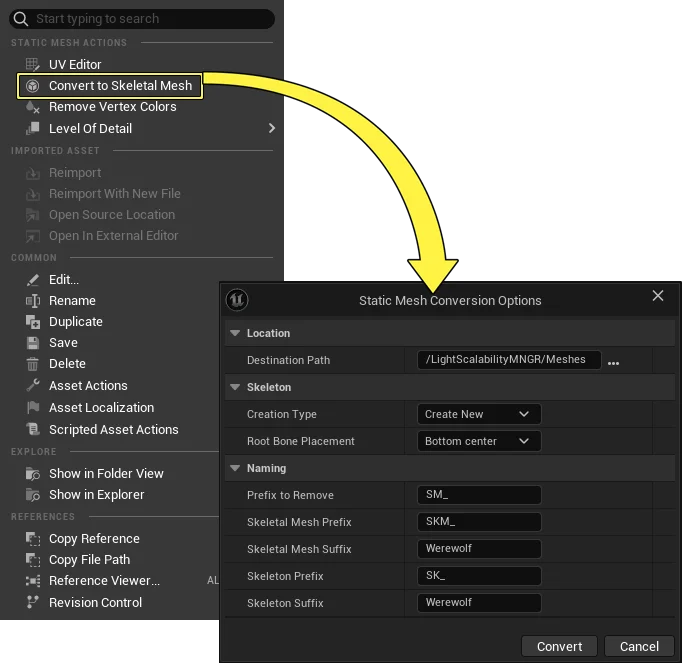
In the Content Browser, right-click your Static Mesh thumbnail. The Static Mesh options open in the context menu.
-
Select Convert to Skeletal Mesh. The Skeletal Mesh Conversion Options window opens.
-
Select a destination for the new asset in the Destination Path field.
You're reading a preview
The full reference is free for BrainDeadGuild Discord members — sign in to read it all, or open the original at the source.
Sign in with your BrainDead.TV / BrainDeadGuild Discord account for full access.